 SleuthLens
Fix · Feature
Know which pins to refresh
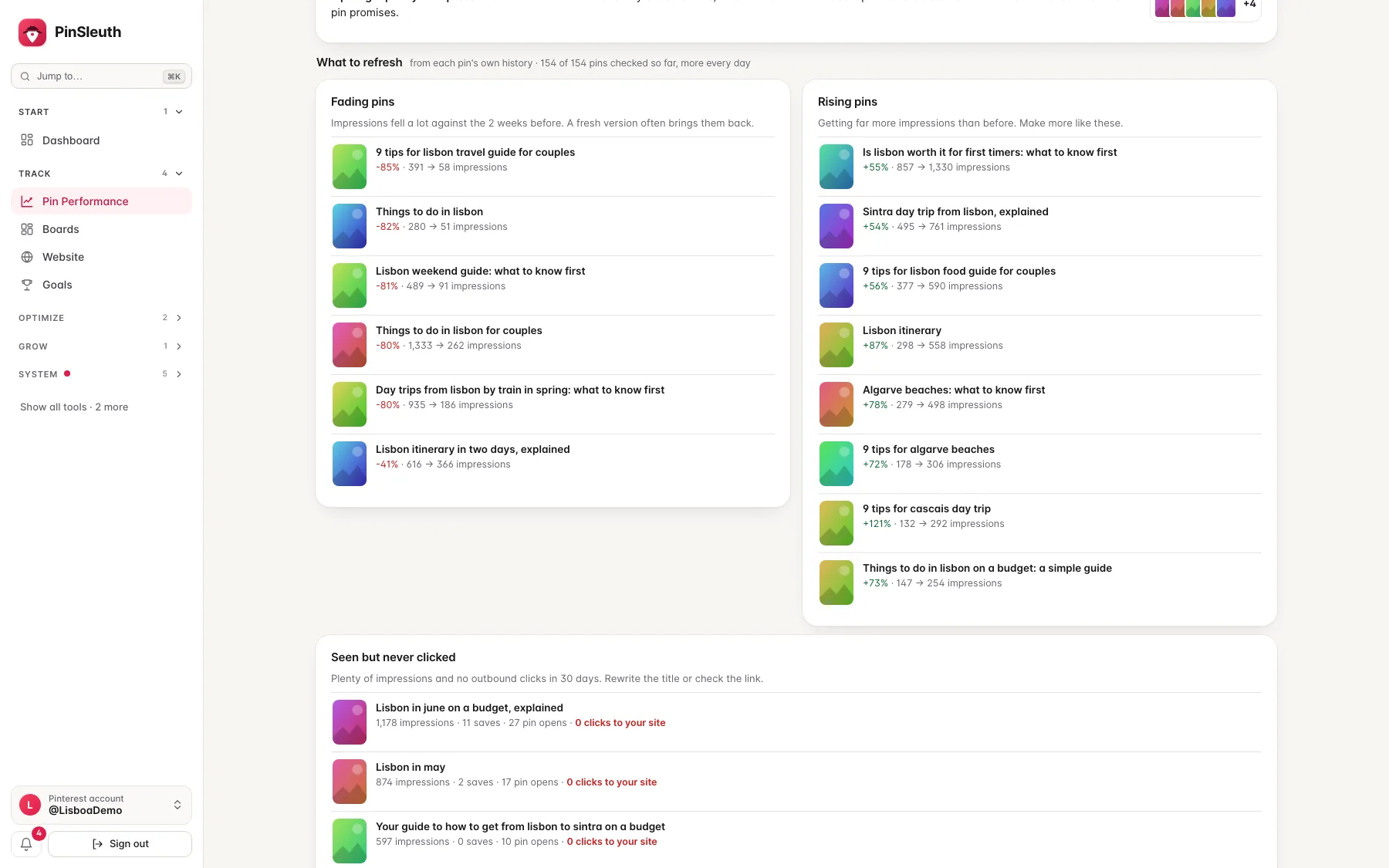
Pinterest keeps showing a pin for weeks and months, so the useful question is which pins are slipping. SleuthLens finds fading pins, rising pins and pins that get seen but never clicked, from each pin’s own history.
What you get
What it does
Fading pins
Impressions fell a lot against the two weeks before. A fresh version of the pin often brings them back.
Rising pins
Pins getting far more impressions than before, so you can make more like them while they are hot.
Seen but never clicked
Plenty of impressions and no clicks to your site. Rewrite the title, or check that the link and the page match what the pin promises.
Three steps
How it works
See your lists
Pin Performance shows the three lists from each pin’s own history.
Pick a pin
Open it to see its numbers day by day.
Write a fresh pin
Make a new image and title for the same page. A new image keeps far more reach than reposting the old one.
Questions
Common questions
Why fresh pins for the same page?
A new pin is a new chance to be seen and saved, without writing a new post.
How many pins per post?
There is no fixed number. Start with the posts that already earn the most.
Keep going
Works well with
Start your 14-day free trial
Pick a plan, add a card, and pay nothing if you cancel within 14 days.